

Introduction
Following our analysis of the Microsoft Teams vishing battleground, security teams worldwide have asked us the same critical question: "How do we actually investigate these attacks?" The answer lies not in reactive scrambling, but in systematic, intelligence-driven investigation using purpose-built queries that expose every stage of these sophisticated operations.
Today, we're releasing Command Zero's comprehensive Microsoft Teams vishing investigation deep dive—over 20 specialized queries that transform how security teams detect, analyze, and respond to these hybrid social engineering campaigns.
The Investigation Reality: Speed vs. Sophistication
When Microsoft Teams becomes an attack target, security teams face a unique challenge. Traditional email security investigations don't capture Teams communications. Endpoint detection focuses on malware, not social engineering. Identity monitoring tracks logins, not phone calls.
Meanwhile, attackers operate with ruthless efficiency:
- Hour 0: Email bombing begins
- Hour 2: Fake IT support calls target confused users
- Hour 4: Ransomware deployment across compromised networks
Your investigation window is measured in hours, not days. The difference between detection and devastation often comes down to asking the right questions in the right sequence.
Investigation Overview: From Detection to Response in minutes
Command Zero's query library transforms Teams vishing investigation from reactive analysis to proactive threat hunting. Here's your systematic approach:
Step 1: Initial Detection (Execute within 30 minutes)
- Run email bombing detection queries for reported spam incidents
- Identify targeted users and campaign scope
- Check for external Teams calls to identified targets
- Alert on Quick Assist usage organization-wide
Step 2: Active Investigation (Execute within 2 hours)
- Analyze Teams call details for all targeted users
- Examine PowerShell execution on potentially compromised endpoints
- Review security alerts across all affected systems
- Document malicious URL sharing during Teams sessions
Step 3: Compromise Assessment (Execute within 4 hours)
- Trace process chains from remote access tools to malware
- Identify persistence mechanisms across all endpoints
- Analyze network connections for C2 communications
- Assess lateral movement attempts and success
Step 4: Campaign Analysis (Execute within 24 hours)
- Correlate email clustering across the full attack timeline
- Map all external Teams contacts to identify threat actor infrastructure
- Build comprehensive attack timeline from email bombing to ransomware deployment
- Document lessons learned and improve detection capabilities
Deep Dive: Microsoft Teams Vishing Investigations
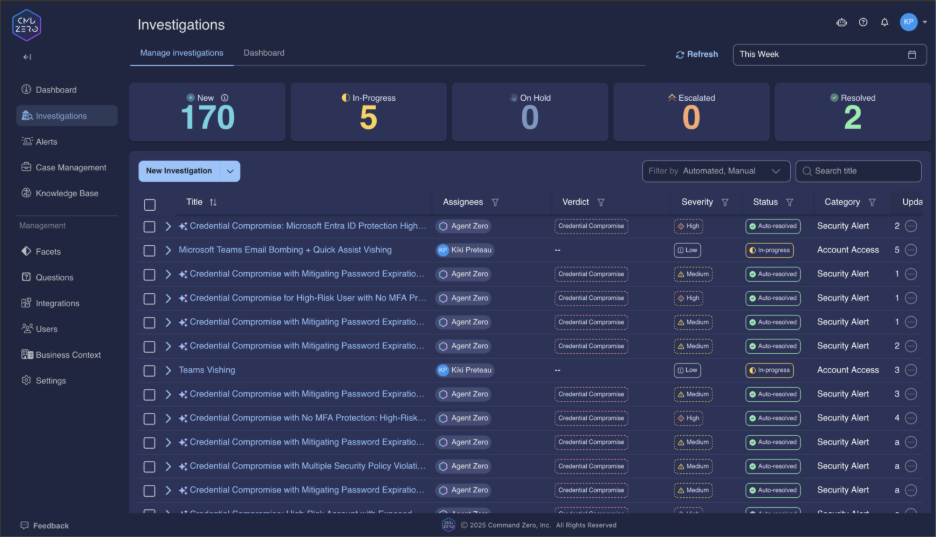
The following four steps summarize a Microsoft Vishing attack investigation using the Command Zero platform:
1. Identify the Email Bombing Campaign
Every Teams vishing attack begins with psychological preparation—overwhelming targets with spam to create urgency and confusion. Command Zero's email investigation queries reveal these campaigns as they unfold.
Primary Detection Query
"What users received an anomalously high volume of external (inbound) emails?"
This single query serves as your early warning system. When users receive 100+ external emails within an hour, you're witnessing active attack preparation.
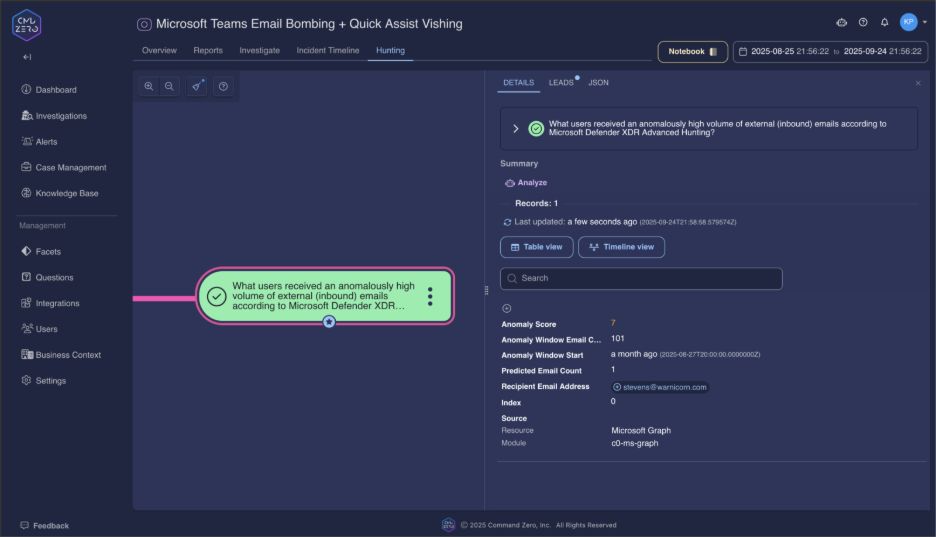
The query results immediately reveal:
- Which users are being targeted for follow-up vishing calls
- The timing window for expected Teams contact attempts
- Campaign scale across your organization
Campaign Scope Analysis
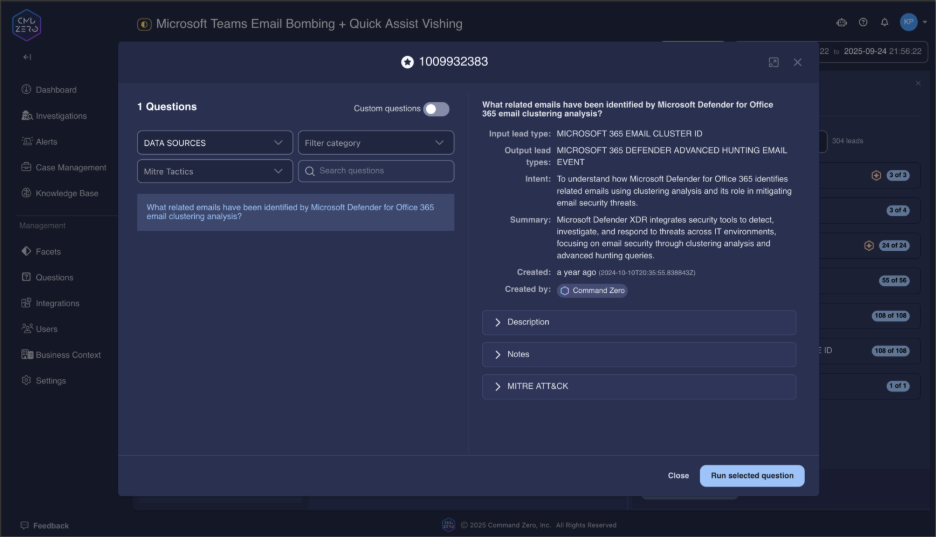
"What related emails have been identified by Microsoft Defender for Office 365 email clustering analysis?"
This query leverages Microsoft's ML clustering to reveal the full campaign scope. Attackers don't target single users—they orchestrate coordinated operations against multiple potential victims simultaneously.
Delivery Success Assessment
"What emails marked successfully delivered exist for this sender?"
High delivery rates indicate attackers have successfully bypassed your email security filters. Use the sender address from reported spam to understand how much of the campaign reached intended targets.
"What emails were reported by users to Microsoft Defender for Office 365 as Phishing or Spam?"
User reports often provide the first alert to security teams. Look for patterns in reported emails that indicate coordinated campaigns rather than isolated spam.
2. Expose Teams Vishing Activities
Once email bombing establishes chaos, attackers initiate "helpful" IT support calls through Microsoft Teams. Command Zero's Teams communication queries expose these social engineering operations in real-time.
External Contact Detection
"What Microsoft Teams calls from external organizers did this user receive?"
This query identifies the core attack mechanism—external Teams calls targeting specific users. Focus on calls occurring within 2 hours of email bombing incidents.
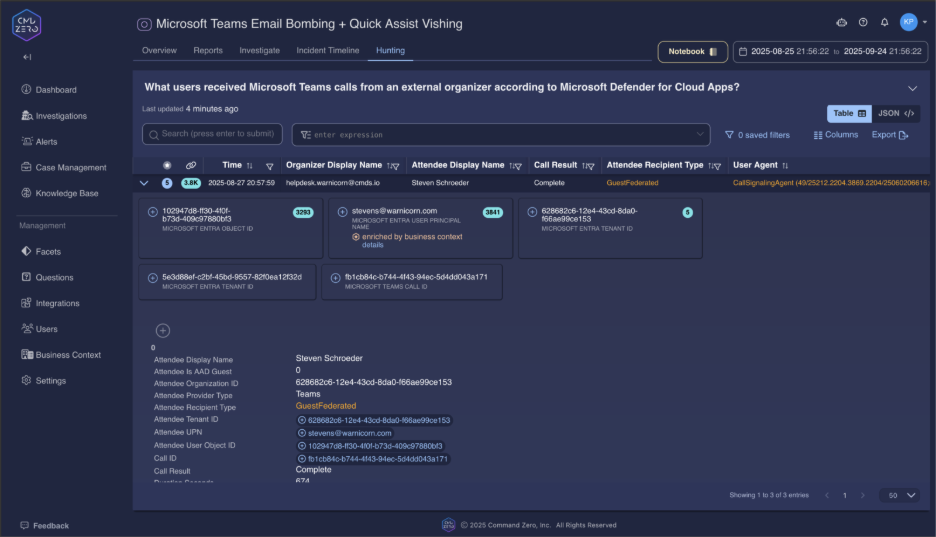
The results reveal critical attack indicators:
- External tenant names designed to appear legitimate ("IT-Support-Services", "Help-Desk-Manager")
- Timing correlation with email bombing campaigns
- Duration patterns that suggest successful social engineering
Organization-Wide Threat Assessment
"What users received Microsoft Teams calls from an external organizer?"
Expand your investigation to identify all potential victims. Coordinated attacks target multiple users to maximize success probability.
Call Detail Analysis
"What Microsoft Teams call records exist for calls this user participated in?"
Deep-dive into specific call details to understand attack progression. Long-duration calls (>10 minutes) often indicate successful social engineering where attackers gain user trust and cooperation.
"What call record session data exists for this Microsoft Teams call?"
Technical session details reveal device information, connection data, and user agent strings that may expose attacker infrastructure or unusual client configurations.
Malicious Link Detection During Calls
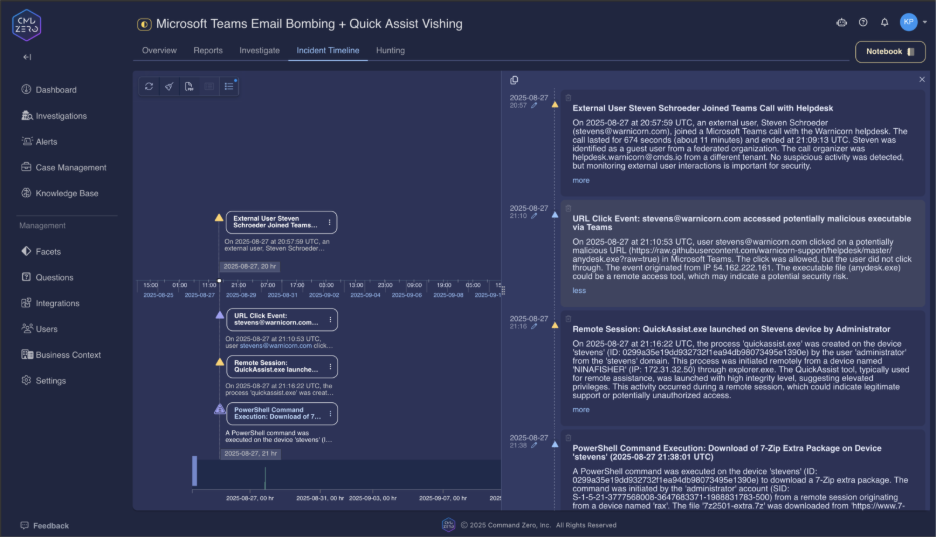
"What Microsoft Teams URL click events permitted by Safe Links exist for this user?"
Attackers frequently share malicious URLs during Teams sessions, directing targets to download remote access tools. Correlate these events with call timestamps to identify successful attack progression.
3. Find Remote Access and System Compromise
The final attack stage involves remote access tool deployment and system compromise. Command Zero's endpoint visibility queries reveal the complete attack chain from initial access to ransomware deployment.
Remote Access Detection
"What Microsoft Quick Assist sessions were initiated?"
ANY Quick Assist usage following external Teams calls represents a critical security incident. This query provides organization-wide visibility into legitimate remote access tool abuse.
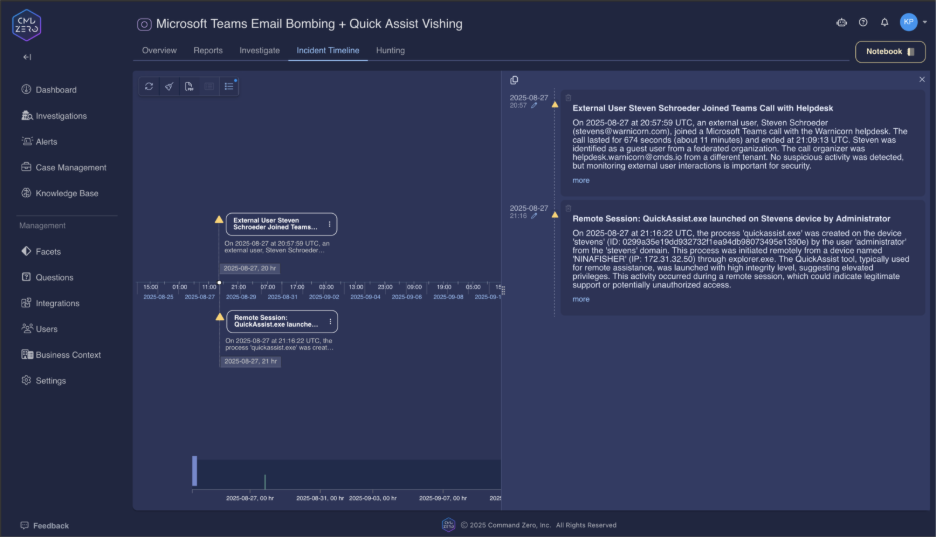
"What Microsoft Quick Assist sessions were initiated on this device?"
Focus on specific endpoints to confirm compromise and understand attack timing. Quick Assist sessions initiated during or immediately after Teams calls indicate successful social engineering.
Initial Compromise Activity Analysis
"What PowerShell commands were executed on this device?"
Attackers typically execute PowerShell commands immediately after gaining remote access. Look for common attack patterns:
- Invoke-WebRequest for malware downloads
- Disable-WindowsDefender for security bypass
- Add-MpPreference for exclusion creation
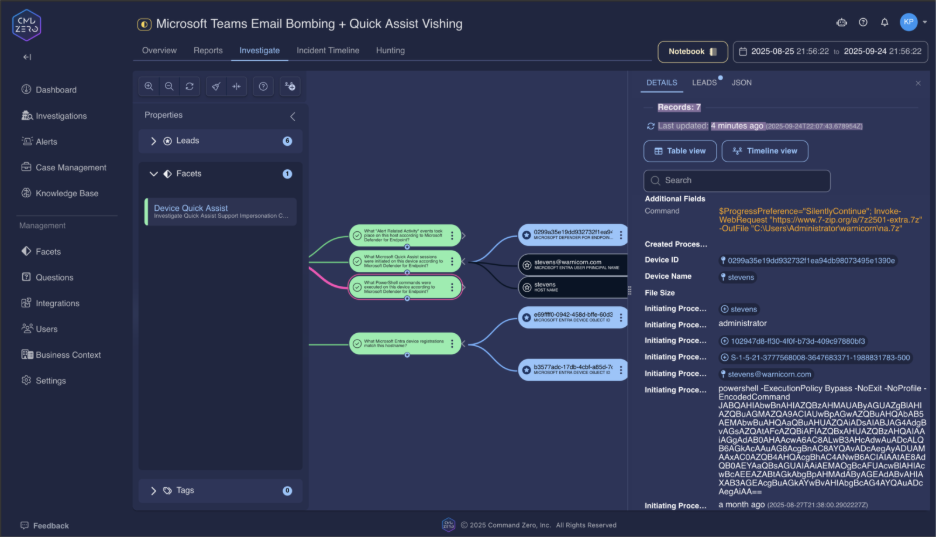
"What 'Alert Related Activity' events took place on this device?"
Correlate all security alerts during the incident timeframe to understand the complete attack sequence and identify additional compromise indicators.
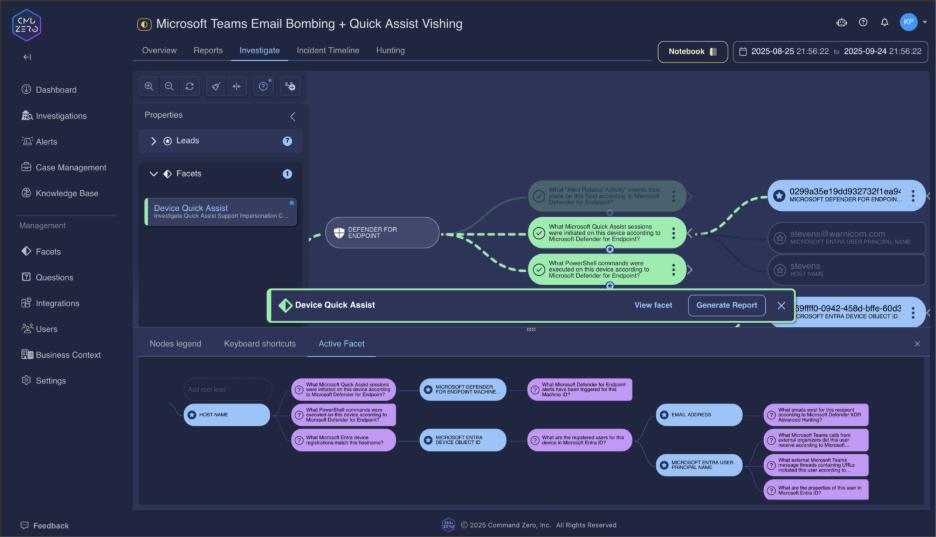
Process Chain Investigation
"What parent process created this process?"
Trace the attack chain from Quick Assist through malware deployment. Legitimate remote access tools spawning unusual processes provides definitive compromise evidence.
"What images were loaded by this process?"
DLL sideloading represents a common persistence technique. Focus on unsigned DLLs loaded from system directories that may indicate sophisticated malware deployment.
"What registry changes were performed by this process?"
Registry modifications often contain C2 server configurations and persistence mechanisms. Examine Run keys and service configurations created during the compromise timeframe.
4. Discover Persistence and Lateral Movement
Sophisticated attackers establish persistence and attempt lateral movement to maximize campaign impact. Command Zero's advanced queries reveal these post-compromise activities.
Persistence Mechanism Detection
"What scheduled tasks have been created, updated, or deleted on this device?"
Scheduled tasks ensure malware survives system reboots. Tasks created during the compromise window indicate successful persistence establishment.
"What services were installed on this device?"
Backdoor services provide persistent access for attackers. Look for services with generic names or missing descriptions installed during incident timeframes.
"What locally managed Defender exclusion registry keys were updated?"
Attackers disable security protections by adding exclusions. ANY exclusions added during incident investigation indicate security tool tampering.
Lateral Movement Analysis
"What Remote Desktop Protocol (RDP) activity targeted this host?"
RDP connections from compromised devices to internal servers indicate lateral movement attempts. Focus on unusual connection patterns during incident timeframes.
"What network connections were initiated by this process?"
Network connections reveal C2 communications and lateral movement attempts. Document unusual IP addresses and ports for threat intelligence correlation.
The Intelligence Advantage: Actionable Investigation Results
Command Zero's Teams vishing queries provide more than detection—they deliver actionable intelligence for immediate response:
Immediate Containment: Identify compromised endpoints within minutes, not hours
Campaign Scope: Understand full attack scale across your organization
Attack Attribution: Correlate infrastructure and TTPs across multiple incidents
Proactive Defense: Hunt for similar campaigns before they reach critical stages
The Future of Instant Communication Security Investigations
Microsoft Teams vishing attacks represent the evolution of social engineering—sophisticated campaigns that blur technical exploitation with psychological manipulation. Traditional investigation approaches fall short because they treat these as either email threats, communication incidents, or endpoint compromises.
Command Zero recognizes these attacks for what they are: coordinated operations that require comprehensive investigation across email, communications, and endpoint telemetry simultaneously.
Our query library provides security teams with the investigative advantage necessary to detect these attacks in progress, understand their full scope, and respond before ransomware deployment devastates organizational operations.
Recommended Next Steps
The difference between successful attack prevention and catastrophic system compromise often comes down to asking the right questions at the right time. With Command Zero's Teams vishing investigation queries, your security team gains:
- Systematic Detection: Purpose-built queries for each attack stage
- Comprehensive Visibility: Complete attack chain analysis from email bombing to ransomware deployment
- Actionable Intelligence: Investigation results that enable immediate response and long-term defense improvement
Don't wait for the next Teams vishing campaign to target your organization. Build your investigation capabilities now, before you need them in an active incident.
Book a demo today to see how Command Zero's Teams vishing investigation queries can transform your security operations from reactive response to proactive threat hunting.
The attacks are evolving. Your investigation capabilities should be too.

Subscribe security updates
Run Better Investigations.
At Every Tier.